Role Assignments
Grant users and groups access to specific resources through role assignments.
Assignments are where authorization becomes concrete. An assignment connects a subject, an organization membership or group, to a role on a specific resource. This determines what actions the subject can take on that resource and, through inheritance, its children.
Assign a role to a user on a resource:
The assignment takes effect immediately – the next access check will include it.
Or assign a role to an entire group, granting all members of the group the role on that resource:
When you assign a role to a user or group on a resource:
- The subject gains all permissions included in that role on that resource
- If the role includes child-type permissions, those propagate down to child resources
- The assignment takes effect immediately
For example, a workspace-admin role might include workspace:edit, proj:read, proj:edit, app:read, and app:edit. If you assign Alice this role on Workspace: Engineering, she can edit the workspace, view and edit all projects within it, and read and edit all apps in those projects. One assignment, broad access.
Users can gain access through two paths: direct assignment on a resource, or inheritance from a parent.
Direct assignment means the role is assigned specifically on that resource. Alice has project-editor on Project: API Backend – she can edit that project because you explicitly granted it.
Inherited access comes from a role on a parent resource that includes child-type permissions. Alice has workspace-admin on Workspace: Engineering, which includes project:edit. That means she can edit Project: API Backend (which is in the Engineering workspace) even without a direct assignment on the project.
When deciding where to assign roles, consider the scope of access needed. If someone needs access to everything in a workspace, assign a workspace role. If they need access to just one project, assign a project role directly. Both approaches are valid – the right choice depends on what access you’re trying to grant.
Users can always have multiple resource-scoped roles – there’s no setting to control this. A user can be a workspace-admin on one workspace and a project-viewer on a project in a different workspace simultaneously.
For organization-scoped roles, multiple roles must be explicitly enabled. When enabled, the permissions from all organization-scoped roles combine additively.
A user might have project-editor and project-reviewer on the same project, giving them permissions from both roles. Or they might have workspace-admin on one workspace and project-viewer on a project in a different workspace – each assignment grants access to its respective resource tree.
In this example, Alice has baseline org access, full control of the Engineering workspace and everything in it, plus read-only access to a sensitive project in another part of the organization.
List assignments for a user:
Remove an assignment:
Access is revoked immediately. Removing an assignment also removes any permissions that were inherited by child resources through that assignment. However, any direct assignments on child resources remain intact.
For groups, the equivalent operations use the group role assignment endpoints:
See the Group role assignment API reference for the full set of list, get, and remove operations.
You can view assignments in the WorkOS Dashboard. Navigate to an organization membership to see all role assignments for that user.
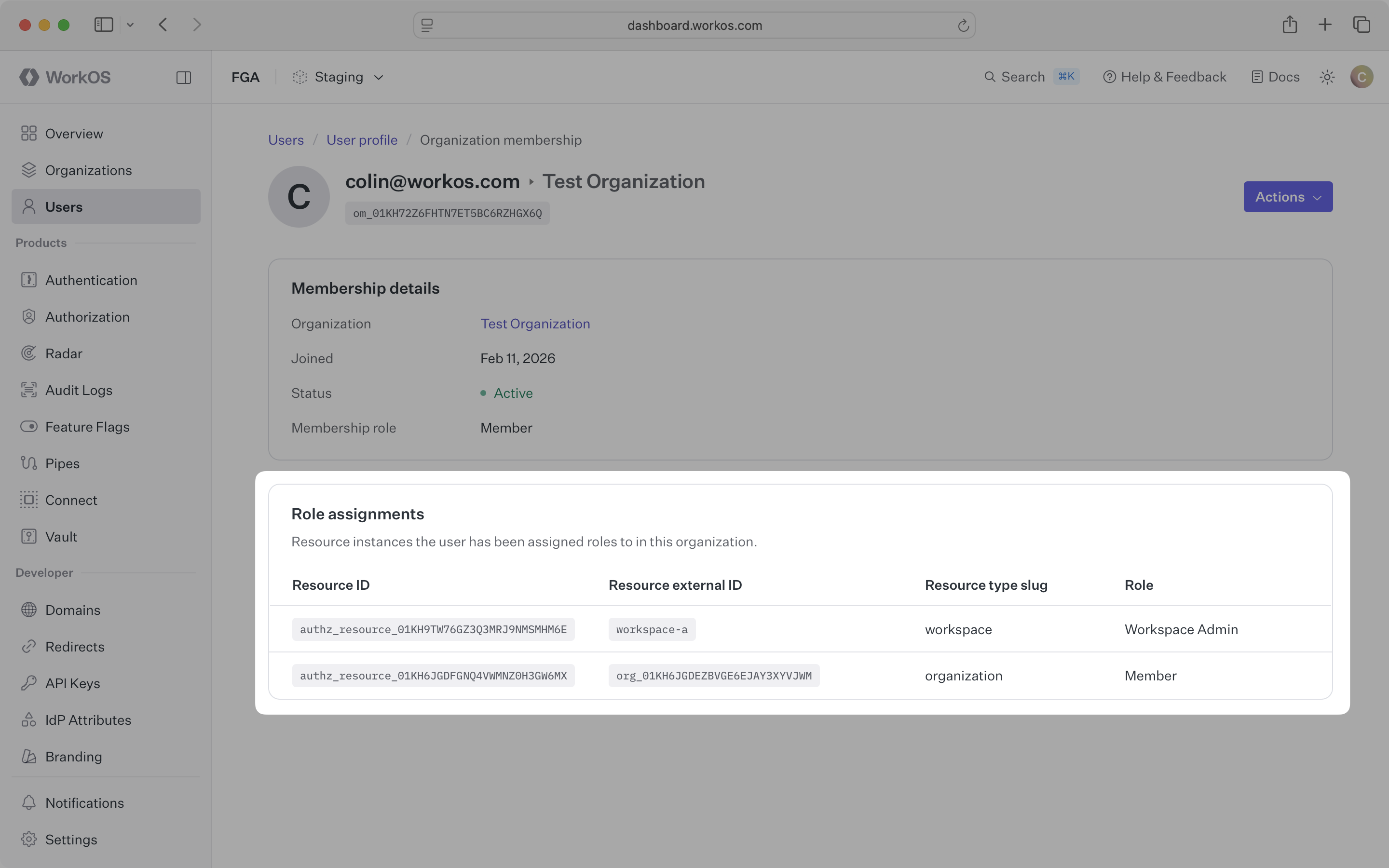
Several operations affect assignments automatically:
When a resource is deleted, all role assignments on that resource and its children are removed. Users lose access without any manual cleanup.
When an organization membership is removed, all of that user’s role assignments within the organization are removed. They can no longer access any resources in that organization.
When a group is deleted, all role assignments on that group are removed. Members of the group lose any access that came from the group’s assignments.
When a member is removed from a group, that member loses all roles that came from the group’s assignments. Any direct assignments on the member’s organization membership remain intact.
When a role’s permissions change, everyone with that role immediately sees the updated permissions. You don’t need to re-assign roles – existing assignments use the new permission set.
Groups let you assign resource-scoped roles to a set of users at once. Instead of creating individual role assignments for each organization membership, assign the role to a group and let WorkOS propagate it to all members.
This is ideal for team-based access patterns – for example, granting all engineers access to an engineering workspace.
Create the group:
Add a member to the group:
Assign a role to the group on a resource:
Every member of the group gains the workspace-admin role on the Engineering workspace. When a new engineer joins the group, they automatically get the same access without any additional assignments.
Roles from group assignments work the same as direct assignments in access checks. A single check call evaluates all role sources and returns the combined result.
For full details on creating groups and managing membership, see Groups and the Group role assignment API reference.
For enterprise customers using identity providers, you can use IdP role assignment for organization-scoped roles while managing resource-scoped roles through the API.
This gives IT contacts control over who belongs to the organization and what baseline access they get, while your application manages the specifics of who can do what on which resources.